Applicable Model: TerraMow S Series
The robot can use cellular data when Wi-Fi is unavailable, allowing you to adjust mowing settings and manage your robot through the TerraMow app.
This guide explains how to purchase and redeem an additional data package, how activation and validity work, and how to check your remaining data.
Before You Start
A redemption code is required to redeem an additional data package purchased from our official website.
If you want to activate the free (gift) data package included with your new robot, please refer to this article: How to Manually Activate Your Free Data Package. You do not need a redemption code for this package.
Purchase a Data Package
If you’re running low on data or your current package has expired, you can purchase an additional data package from our official website:
You will receive a redemption code after completing your purchase. Use this code to redeem your package in the TerraMow app.
How to Redeem Your Data Package
1. Copy the redemption code you received after your purchase.
2. Open the TerraMow app and go to your robot’s device page.
3. Tap Settings > Network & Bluetooth > Cellular Data > Subscribe > Redeem with Code.
4. Paste your redemption code and follow the on-screen instructions to complete the redemption.
See the activation and validity rules below to understand when your package becomes active and when its validity period begins.
Activation and Validity Rules
1. Validity: Each 1 GB cellular data package is valid for one year, starting on the date it is activated.
2. Automatic activation: When your current package runs out of data or expires, an additional redeemed package will automatically activate if one is available.
3. Expiration: Any unused data expires at the end of that package’s one-year validity period and does not roll over to the next package.
How to Check Your Data Usage and Remaining Data
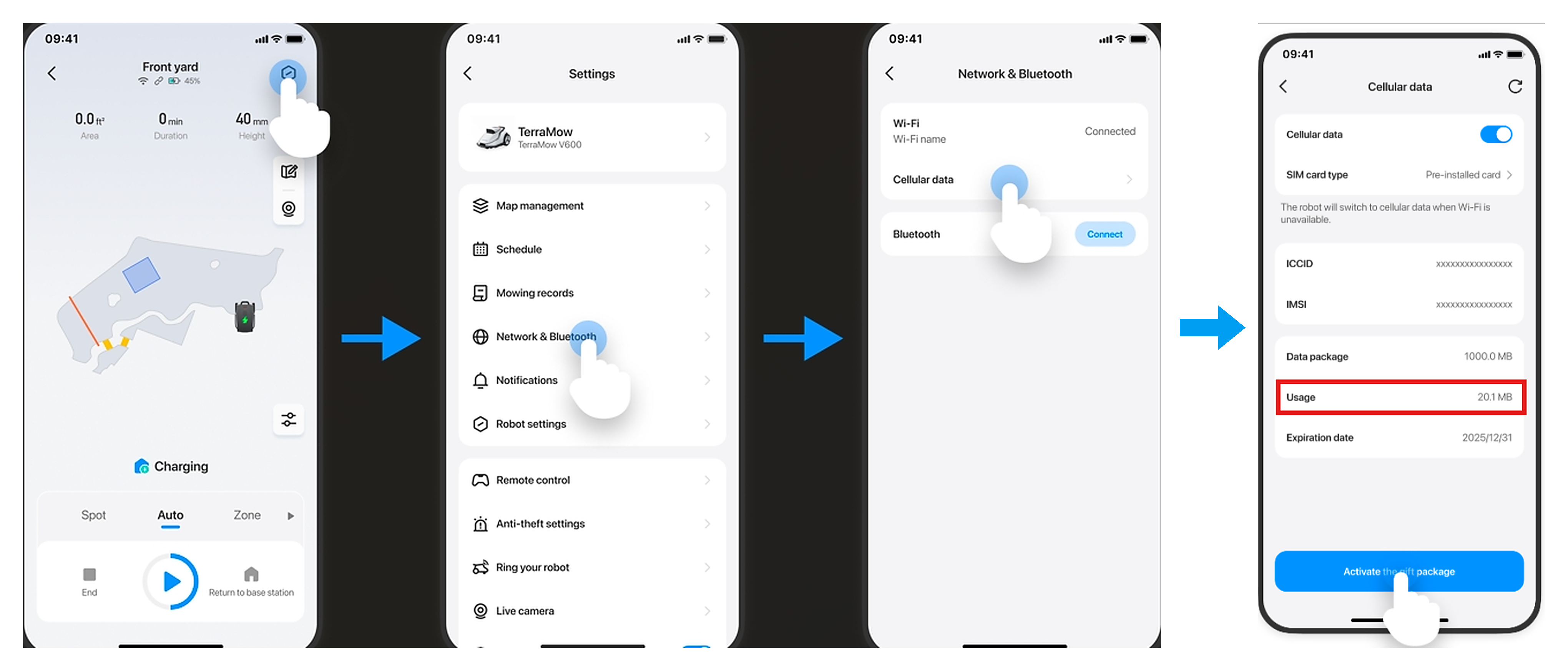
1. Open the TerraMow app and go to your robot’s device page.
2. Tap Settings > Network & Bluetooth > Cellular Data.
3. View your data usage and remaining data on this page.
Having Trouble Activating Your Package?
Need More Help?
For further assistance, contact the TerraMow Customer Service Team at support@terramow.com or submit a support ticket.